Websites & Applications
You Probably Don't Need an App. You Need a Better System.
When something in the business feels broken, 'we should build an app' is a tempting answer. It's usually the wrong first step.

When something in the business feels broken, “we should build an app” is a tempting answer. It’s usually the wrong first step.
Somewhere along the way, “app” became the default answer to almost any business problem with a digital flavor.
Intake is messy? Build an app.
Customers keep calling for updates? Build an app.
The team can’t find anything? Build an app.
Apps are wonderful when they’re the right tool. But most of the time, what a growing business actually needs is a better system.
And those are not the same thing.
The difference
An app is a piece of software.
A system is how work moves through your business — the forms, handoffs, notifications, approvals, records, and decisions that turn a request into a result.
If the system is broken, an app just gives you a broken system with a login screen.
Signs you may need a better system rather than a new application:
The same information gets typed into three different places.
Customers email or call for things they should be able to do themselves.
Nobody is quite sure where the current version of something lives.
A process works beautifully — as long as one specific person is involved.
Staff regularly copy information from one system into another.
Work disappears into inboxes and has to be chased down manually.
Customers have no easy way to know what happens next.
Those problems are usually not caused by a lack of software. They are caused by the way the work is organized.
Start with the process
Before you price out an app, write down the steps of the process on one sheet of paper.
☐ Where does the process start?
☐ What information comes in?
☐ Who touches it?
☐ What decisions have to be made?
☐ What does the customer need to know?
☐ Where is the record kept?
☐ What happens when something goes wrong?
If you can’t describe the process clearly, software will not fix it yet. Technology can automate a good process. It can also automate confusion.
A simple example
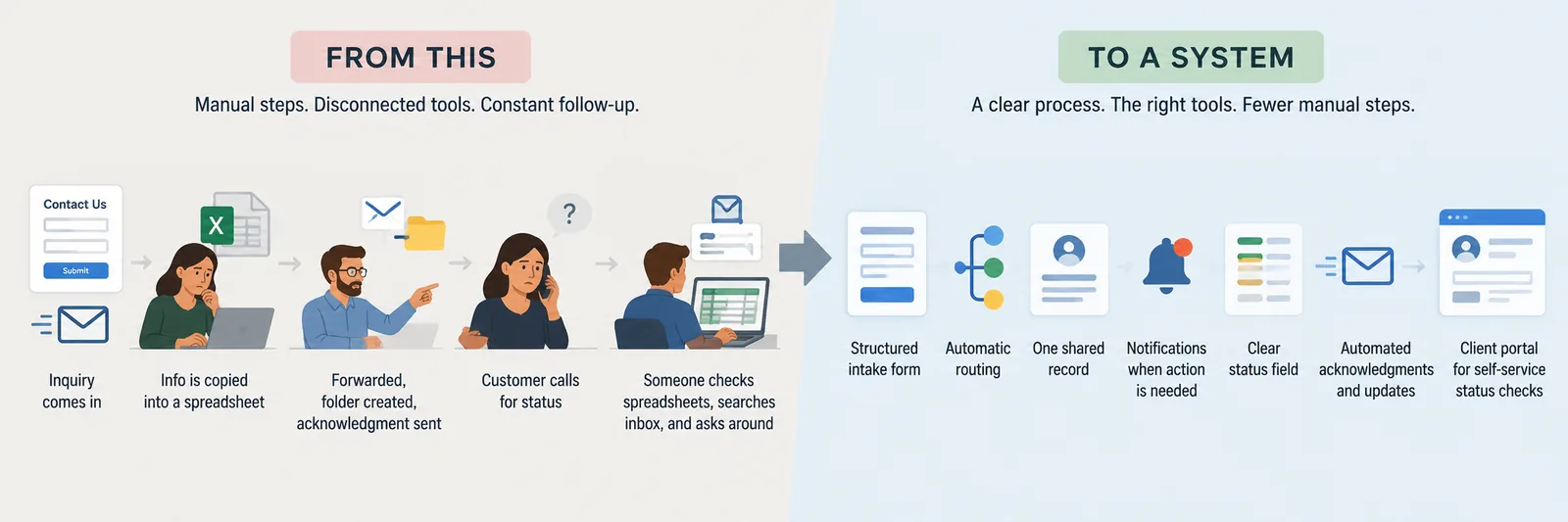
Imagine a growing professional-services firm. A prospective client fills out a contact form or sends an email. Someone reads the message, copies the information into a spreadsheet, forwards it to the right employee, creates a folder, sends an acknowledgment, and makes a note to follow up.
The process works, but only because people keep it working.
A few days later, the client calls for an update. Someone checks the spreadsheet, searches through an inbox, and asks a colleague whether anything has happened. Eventually, the client gets an answer. Nothing has necessarily gone wrong, but several people have spent time finding information that should have been readily available.
As the business grows, this happens more often. More inquiries come in, more people become involved, and more spreadsheets, folders, emails, and reminders are added to keep everything moving. What once worked reasonably well begins to feel increasingly difficult to manage.
That is often the point when someone says, “We need an app.”
Maybe. But before deciding what to build, there is a more useful question to ask:
What should this process actually look like?
Perhaps a prospective client completes a structured intake form that captures the right information from the beginning. The request is automatically routed to the appropriate person, and one shared record becomes the source of truth for the client and the work being performed. The system can notify employees when action is required, send acknowledgments and updates automatically, and give the client a place to check status without having to call or email.
That is a system.
And it may not require building something from scratch. Parts of it might already exist in software the company owns. Other pieces may simply need to be connected or configured differently. As the business grows, there may eventually be a good reason to build something custom.
But that decision comes later. First, you understand how the work should flow. Then you determine what technology should support it — not the other way around.
What a better system looks like
A better system does not necessarily mean more software.
It might be a well-built form that routes inquiries to the right person automatically.
A better system does not necessarily mean adding more software. In fact, sometimes the best solution is getting more out of the tools you already have and making them work together the way the business actually works.
That could mean replacing an inbox-driven process with a well-designed intake form that automatically routes a request to the right person. It could mean connecting two systems you already pay for so employees no longer have to copy information from one to the other. A shared dashboard might replace several spreadsheets and email threads, while automated notifications make sure work keeps moving without someone having to remember who needs to do what next.
For customers, the improvement may be just as simple. Instead of calling or emailing whenever they need an update, they might have a portal where they can see their status, provide information, upload a document, or understand what happens next.
And sometimes, after you have worked through all of that, the answer really is a custom application. By then, however, you are not building an app because the business feels inefficient. You are building it because you understand the process, know what needs to change, and have determined that existing tools cannot do the job well enough.
That is the distinction. The goal is not to avoid technology or custom development. It is to understand the problem first, then build the right solution around it.It might be a client portal where customers can check their own status.
It might be two tools you already pay for, finally connected so they share data.
It might be a shared dashboard that replaces a collection of spreadsheets and email threads.
It might be an automated workflow that moves a request to the next person without someone having to remember to forward it.
And yes — occasionally, it really is a custom application.
The goal is not to avoid building things. It is to build the right thing, in the right order, for the actual problem.
When an app actually makes sense
There are times when a custom application is exactly the right answer.
For example:
Your workflow is genuinely unique and existing tools cannot support it well.
Customers need a dedicated digital experience that cannot be delivered through existing platforms.
The volume of work has grown beyond what manual processes or basic automation can handle.
Several systems need to work together through one consistent interface.
The process is already understood, stable, and valuable enough to justify custom development.
The application itself creates a competitive advantage.
The important distinction is that the app is solving a clearly defined problem.
It is not being asked to define the problem for you.
Build the system first
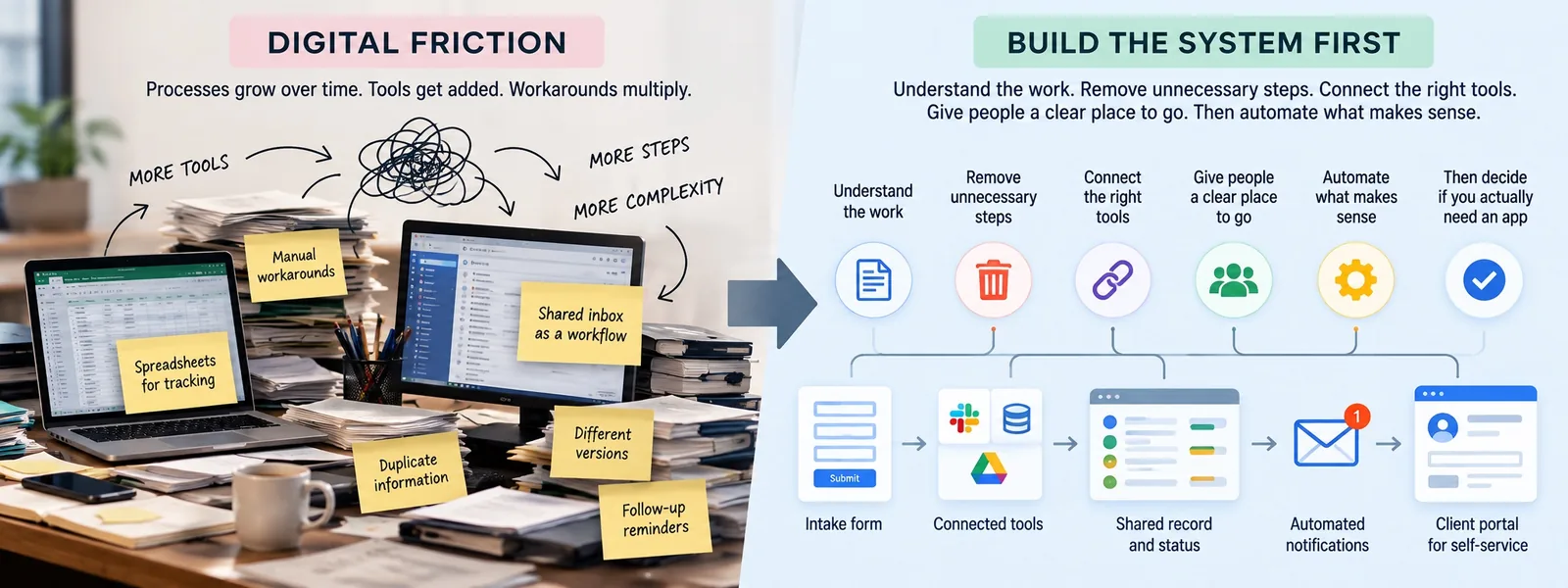
Growing businesses have a way of accumulating digital friction over time. A spreadsheet gets created to solve one problem, a shared inbox gradually becomes part of the workflow, and employees develop manual workarounds to bridge the gaps between systems. Those workarounds often lead to other workarounds, until a process that once seemed relatively simple depends on a collection of tools, habits, and institutional knowledge just to keep moving.
Eventually, it can seem as though the answer must be a major new piece of technology. Sometimes it is. But before making that investment, there is often a much bigger opportunity in looking at the process itself.
Start by understanding how the work actually gets done today and how it should work instead. Remove steps that no longer serve a purpose, connect the tools that need to share information, and give employees and customers a clear place to go for what they need. Once that foundation is in place, automate the parts of the process where automation genuinely saves time or improves the experience.
Then ask whether you still need an app.
You may find that you do. But if you build the system first, you will have a much better idea of what that app actually needs to do.
Have a process that isn't working?
Tell us what's getting in the way. We'll help you think through what should exist instead.
Start a ConversationKeep reading